
I have a lot of side projects. One of them even runs security scans against the WordPress.org plugin repo. Ironically, I have never personally published anything to WordPress.org.
Not because I think the directory isn’t valuable. The opposite. WordPress.org is one of the most valuable pieces of infrastructure in the entire ecosystem. Discovery, trust, automatic updates, the install count badge people use for landing pages. It’s the best way for an indie developer to put code for a wider audience.
That said, I don’t think it’s a requirement.
I really like being able to self-publish directly on GitHub. It holds closer to the open source ideal of owning your stuff. Your source of truth is a git repo you control. Your release artifacts are files you attach. Your update channel is a URL you can point anywhere. Nobody has to approve a guideline ticket before a fix ships.
Direct publishing costs you a certain kind of visibility.
When you skip WordPress.org, you lose the dashboard numbers that make a plugin feel real. Active installs. The daily download graph. The review stars next to your name. The “Last Updated” badge that reassures people you are still around.
I also refuse to fill that gap with product telemetry. I do not want a phone-home beacon in tools I ship. If a CLI or plugin needs to call home just so I can feel good about usage charts, something about the product is off.
So the question becomes: What can GitHub itself tell me, without me inventing a metrics pipeline?
Turns out, more than I expected. Not “active installs.” But enough to know whether anyone is actually grabbing the releases.
GitHub already counts every asset download.
Every GitHub Release can attach binary assets. A cove.sh. A plugin zip. A PHAR. For each of those files, GitHub keeps a download_count on the Releases API. Stars live on the repository object. Neither requires a tracker script inside the product.
A single anonymous call is enough to see the whole picture for one repo. No token, no login, no account. Public repos hand this over to anyone who asks.
curl -s \
  "https://api.github.com/repos/anchorhost/cove/releases?per_page=100" \
  | jq '.[] | {tag: .tag_name, downloads: ([.assets[].download_count] | add)}'
You only need a token if you are hitting the API hard. Anonymous calls are capped at 60 per hour per IP. A personal access token raises that to 5,000. For a handful of repos synced once a day, 60 is plenty.
These counts only cover attached release assets. The auto-generated Source code zip and tarball GitHub adds to every release are not included. Drafts do not count until you publish. And a download is a download. It is not a unique human, not an active install, and not a heartbeat from a machine still running last month’s build.
Still. For a self-published tool, asset downloads are the closest thing to “people are actually using the release channel.”
So I built a tiny dashboard for my own projects.
I wanted one local page where I could see Cove next to Disembark next to Minn Admin next to CaptainCore, with stars and download totals in the same place. I designed it in Claude Design, then asked Claude Code to turn the mock into a real Cove plain site.
That is the whole product. app/github.php talks to GitHub. data/releases.sqlite sits outside the web root. public/index.php is the front controller. A daily php app/cli.php sync is enough to keep the numbers honest.
I call it Release Tracker. It only runs on my machine. That is the point. My usage dashboard does not need a SaaS bill or a tracking pixel. Want one for yourself? Just ask Claude Code to build one.
Cove is a clean case study.
Cove is a local WordPress environment CLI. It ships as a single cove.sh from GitHub Releases. People install it with a curl-to-bash one-liner pointed at the latest asset. Every upgrade path ends at the same place: download the file GitHub is hosting.
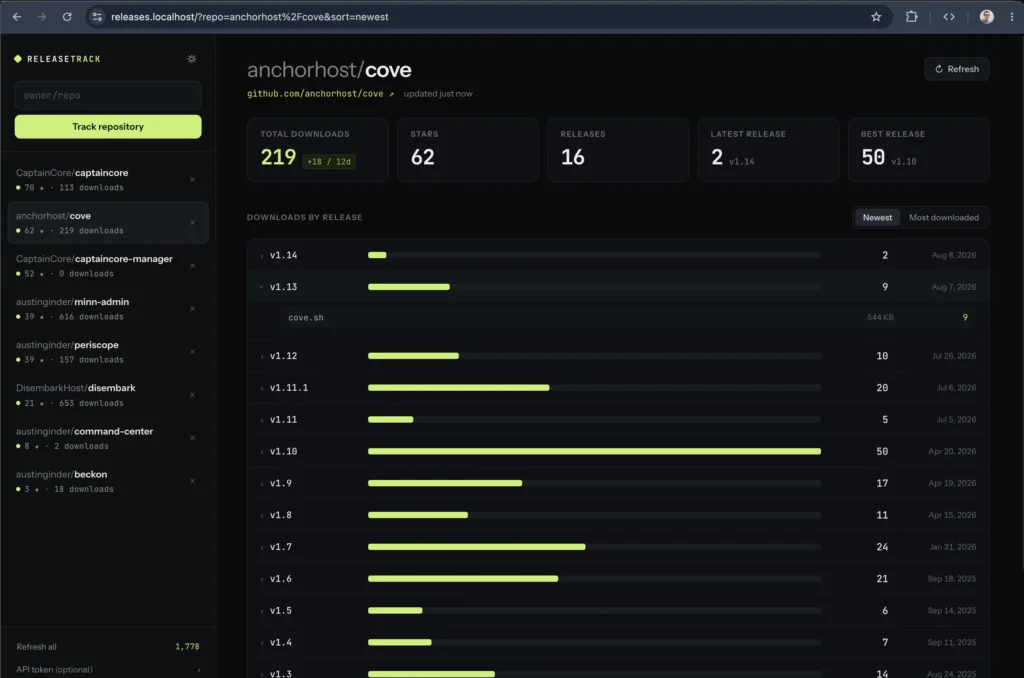
Right now the board for anchorhost/cove looks like this.
v1.10 is the clear winner so far at 50 downloads. Newer tags are still climbing. The daily snapshot pill on the total shows +18 / 12d, which is the kind of gentle growth signal I actually care about. Not a vanity spike. Just proof the install path is still getting used.
Active installs are not available. Downloads per release are a decent way to estimate.
WordPress.org’s “active installations” number is a category of its own. It comes from sites phoning home. GitHub doesn’t know that. What you can approximate is what I’d call good enough. When each release is a full replacement artifact, and your users update by downloading the new file, downloads on the latest release roughly track how many people moved forward.
It is messy in useful ways.
- CI systems and mirror scripts inflate counts.
- Someone who installs once and never upgrades disappears from the latest tag.
- Someone who re-downloads the same tag twice counts twice.
- A long-lived release accumulates more downloads than a release you replace in a week, even if the user base is the same size.
So I do not treat a single release total as “active users.” I look across the last few tags. If every new Cove release eventually lands in the same band of downloads, that is a stable-enough picture of the update base. If a new release stalls far below the previous one, something about discoverability, the upgrade notice, or the install docs probably broke.
Stars might be more valuable than WordPress.org reviews.
A star is a low-friction signal that someone wants to remember the project. A WordPress.org review is a higher-friction signal that someone installed the plugin, found the support tab, and wrote a paragraph. Both are useful. They measure different things.
For indie tools, stars often move first. They show up from README traffic, from a blog post, from someone starring a dependency they adopted. Reviews lag months behind, if they arrive at all. And review systems get gamed. Stars get gamed too, but the cost of a fake star is not a fake five-paragraph testimonial.
More importantly, stars travel with the repo. If I rename the project, move the org, or rebuild the landing page, the star count still points at the same source tree. Ownership stays intact.
Across the side projects, the board is uneven in a good way.
Release Tracker currently watches eight of my repos. Sorted by downloads, the list is a reminder that “side project” covers very different maturity levels.
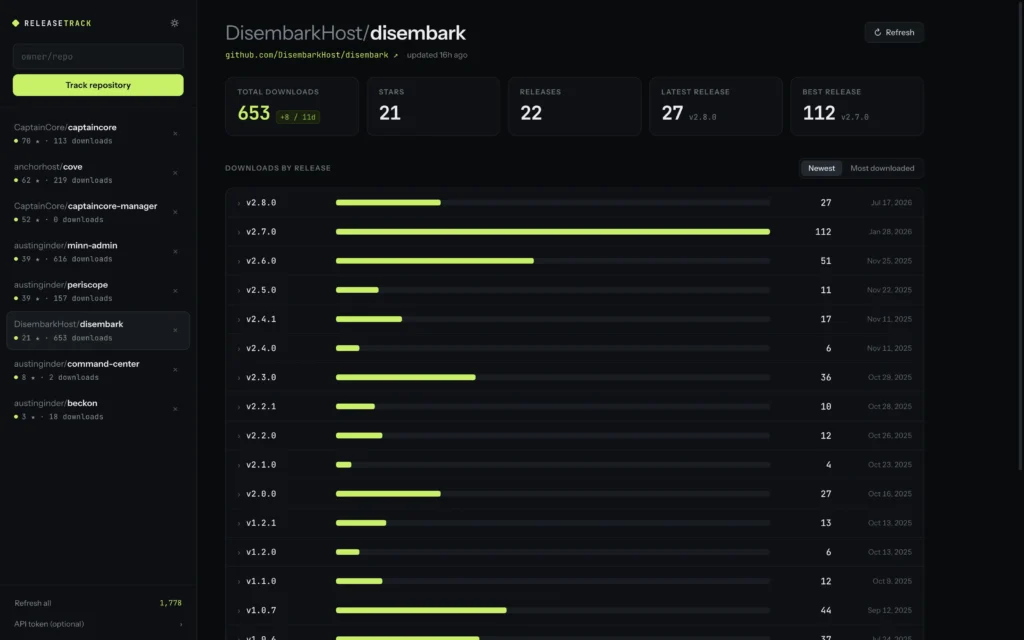
Disembark leads downloads. CaptainCore leads stars. Minn Admin ships almost every day, and the download curve looks like a release cadence chart more than a one-time launch spike. Cove sits in the middle with a healthy star-to-download mix for a CLI that is still early.
CaptainCore Manager is the interesting one. Fifty-two stars and zero downloads, because it has never cut a GitHub Release at all. It deploys straight from git. The metric only exists if you actually use the release channel.
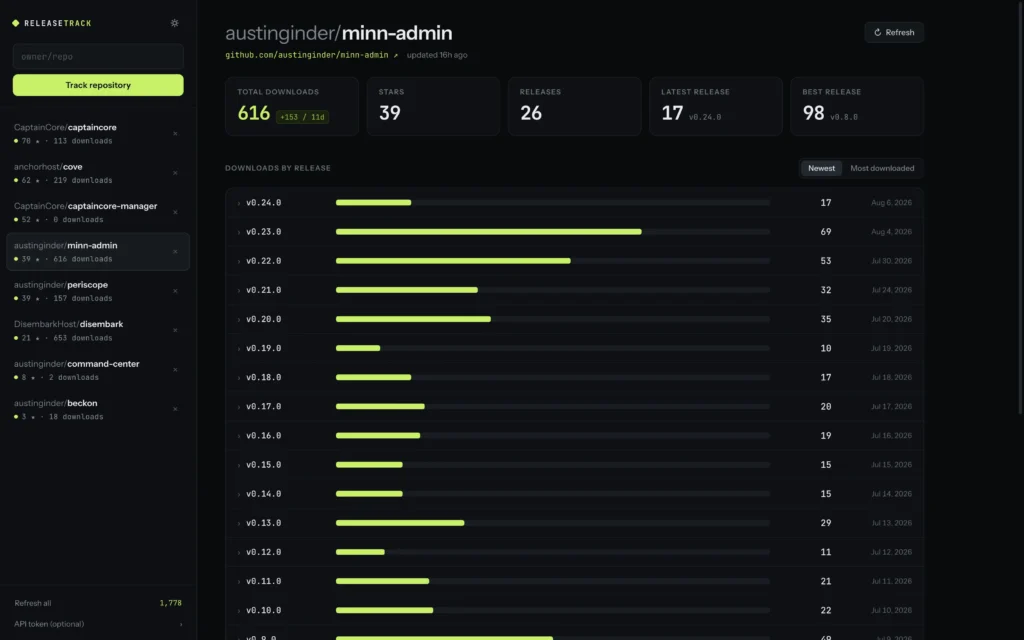
Fleet-wide, that is 294 stars and 1,778 asset downloads without a single WordPress.org listing in the mix. I would not trade that independence for a directory badge.
WordPress plugins can self-update from GitHub just fine.
For the WordPress plugins, the release model is boring on purpose. Ship a zip on the GitHub Release. Publish a small manifest.json with the version and download URL. Hook site_transient_update_plugins so the site admin screen offers the update like any other plugin.
Users never have to know the zip came from GitHub instead of WordPress.org. They click Update. WordPress downloads the asset. GitHub increments download_count. Release Tracker picks it up on the next sync.
That loop is how Minn Admin, Anchor Blocks, and several other tools I maintain get from my laptop to a customer site without me owning a wp.org SVN checkout.
Owning the release is the feature.
I am not anti-WordPress.org. When a plugin belongs in the directory, the directory is still the right distribution channel. Huge audience. Familiar update UX. A support forum people already know how to use. It’s honestly the distribution channel most folks should use.
For a lot of what I build, though, the directory is optional. Developer tools. Hosting utilities. Experiments. Things that move faster than a review queue. Things I want to keep under an org I control, with a license I chose, on infrastructure I can rebuild if a platform changes the rules.
GitHub doesn’t track active installs. It gives me stars, release asset downloads, and a history of every tag I ever shipped. That is enough signal to know whether a project is alive. The rest of the feedback still arrives the old-fashioned way. Issues. Emails. People telling me they installed it.
I can live without the telemetry in exchange for greater control over what I make and how it’s distributed.
