
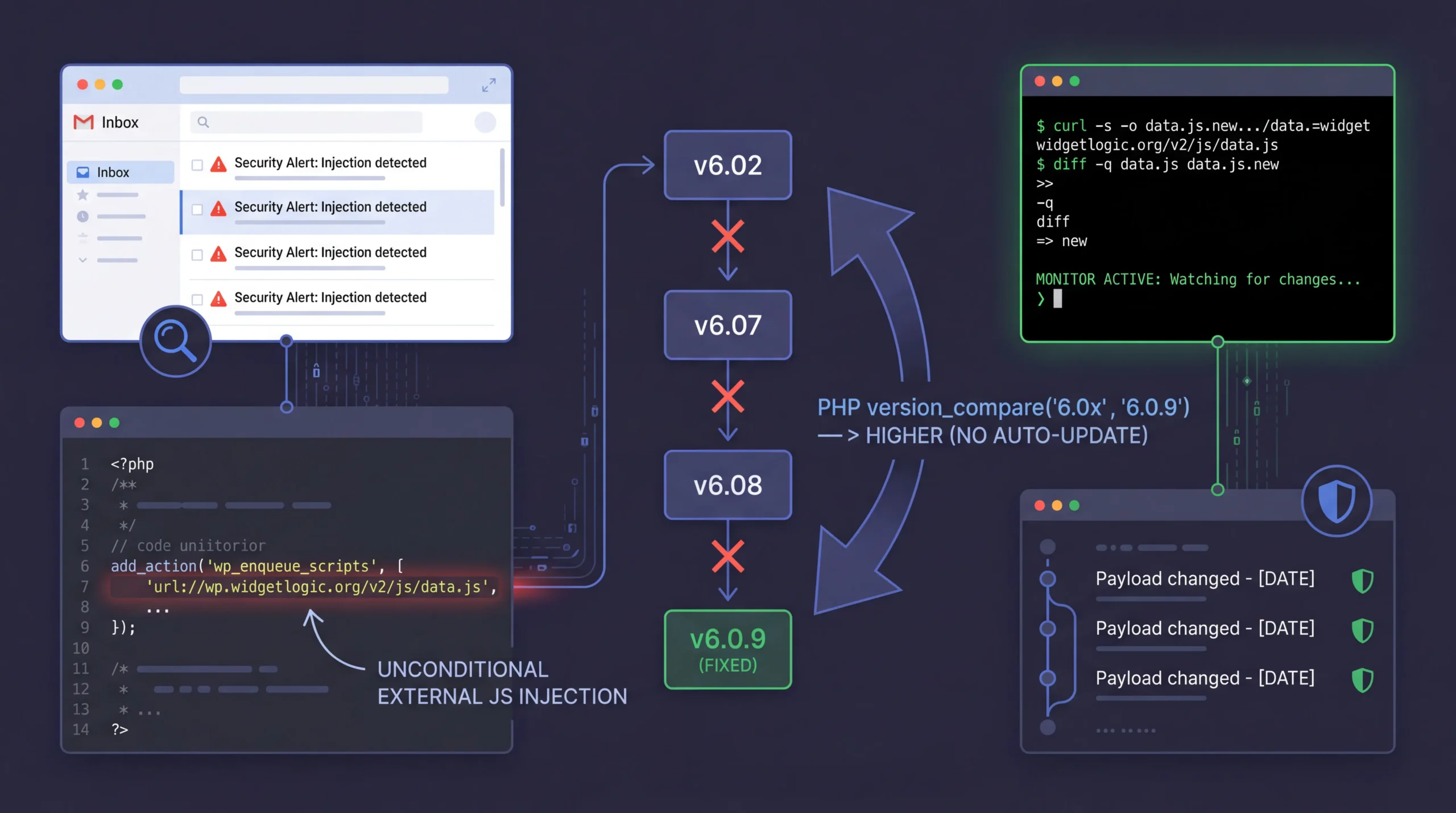
This morning started with a batch of security alerts in my inbox. Nothing unusual. CaptainCore captures every site’s homepage daily and flags new external scripts. Most of the time, it’s a false positive. A plugin update added a new CDN, or a sister site is sharing assets. I review them, confirm they’re safe, and close them out.
But one alert led somewhere I didn’t expect.
Most injection alerts are false positives.
Seven “Security Alert: Injection detected” emails landed between 5am and 9am, each flagging a different site for loading unknown external scripts. I pulled them all up in Claude Code and started working through them.
Six of the seven were straightforward. Sister sites sharing plugin assets across domains. Known CDNs from website builders. A staging site loading its production theme CSS. All safe, all explainable.
Then there was one left.
A 142KB football widget had no business being there.
The alert flagged an external script loading from widgetlogic.org:
https://widgetlogic.org/v2/js/data.js?t=1774396800&ver=6.0.0I curled it. The response was a minified Vue.js application for displaying live football scores. On a client’s business website.
The source was a plugin called Widget Logic. A name most WordPress developers would recognize. It’s been around since 2008 and has over 3 million downloads. The original plugin, by Alan Trewartha, did one simple thing: let you control which widgets appear on which pages using conditional tags.
But the version installed on this site wasn’t doing that at all.
Someone bought a trusted name and gutted it.
I had Claude Code download multiple versions of Widget Logic from wordpress.org to trace when the injection started.
Here’s the ownership chain we pieced together:
| Version | Date | Author | External JS |
|---|---|---|---|
| 0.2 – 0.57 | 2008 – 2015 | Alan Trewartha (original) | None |
| 5.7.0 – 5.10.4 | 2017 – Jul 2019 | WPChef / wpchefgadget | None |
| 5-year gap. No updates. | |||
| 6.0.0 | Aug 6, 2024 | widgetlogic.org | Every page |
| 6.02 | Aug 28, 2024 | widgetlogic.org | Every page |
| 6.0.9 | Jan 15, 2026 | widgetlogic.org | Only when block used |
| 6.07 | Jan 7, 2026 | widgetlogic.org | Every page |
| 6.08 | Jan 12, 2026 | widgetlogic.org | Every page |
The domain widgetlogic.org was registered on June 6, 2024. Exactly two months before version 6.0.0 appeared. The new owner replaced the original single-file plugin with a multi-file structure that includes a “Live Match Widget” and a config file pointing to their domain.
Here’s the injection point in widget.php from version 6.02:
add_action('wp_enqueue_scripts', function() {
    $cfg = require('widget_cfg.php');
    $url = $cfg['base'];  // https://widgetlogic.org/
    $ver = $cfg['ver'];   // v2
    $t = time();
    $t = $t - $t%(12*60*60);

    wp_enqueue_script(
        'widget-logic_live_match_widget',
        "{$url}{$ver}/js/data.js?t={$t}",
        array(), '6.0.0', true
    );
});
No conditional check. No widget detection. Just wp_enqueue_script on every single frontend page load.
Version numbers lie.
At first I thought this might be an honest mistake. A new developer who didn’t realize they were loading scripts unconditionally. There was even a support thread on wordpress.org about it, and version 6.0.9 appeared to fix the issue by switching to wp_register_script, which only loads the JS when the Live Match block is actually placed on a page.
But then I noticed the version numbers.
WordPress uses PHP’s version_compare() to determine whether a plugin update is available. The “fixed” version is 6.0.9. The injecting versions are 6.02, 6.07, and 6.08. Here’s how PHP interprets those:
version_compare('6.02', '6.0.9');  // 6.02 -> parsed as 6.2 -> HIGHER than 6.0.9
version_compare('6.07', '6.0.9');  // 6.07 -> parsed as 6.7 -> HIGHER than 6.0.9
version_compare('6.08', '6.0.9');  // 6.08 -> parsed as 6.8 -> HIGHER than 6.0.9
WordPress auto-updates will never move a site from 6.02, 6.07, or 6.08 to 6.0.9. It thinks they already have a newer version.
And the timeline makes the intent clear. Versions 6.07 and 6.08 were released just days before the 6.0.9 “fix”:
is_admin() ? wp_register_script : wp_enqueue_script. Still force-enqueues on the frontend.wp_register_script. No affected site will ever auto-receive it.The code in 6.07 and 6.08 is worth examining. It uses a ternary that looks like it conditionally registers:
call_user_func(
    is_admin() ? 'wp_register_script' : 'wp_enqueue_script',
    'widget-logic_live_match_widget',
    "{$url}{$ver}/js/data.js?t={$t}",
    array(), '6.0.0', true
);
On the admin side, it registers. On the frontend, where your visitors are, it enqueues on every page —just enough plausible deniability to look like an oversight.
WordPress.org closed it in 20 minutes.
I drafted a detailed report and sent it to the WordPress.org Plugin Review Team. The version timeline, the version_compare manipulation, the scope: 13 sites across our fleet at Anchor Hosting stuck on versions that would never auto-update to the fix.
Their response:
Plugin closed. But that raised a new concern.
A closed plugin is still a loaded gun.
The plugin was closed on wordpress.org, but the data.js file is still served from their domain. They can change it at any time, for any site still loading it.
So I set up a git-based monitor. A shell script runs hourly, fetches the JS payload, and commits to a local git repository if anything changes. If a change is detected, it scans for suspicious patterns and sends an alert email.
#!/bin/bash
# Monitor widgetlogic.org JS payload for changes
MONITOR_DIR="/Users/austin/Cove/Scripts/widgetlogic-monitor"
JS_URL="https://widgetlogic.org/v2/js/data.js"

cd "$MONITOR_DIR" || exit 1

# Fetch current payload
TIMESTAMP=$(date +%s)
curl -s -o data.js.new "${JS_URL}?t=${TIMESTAMP}"

# Compare with previous version
if diff -q data.js data.js.new > /dev/null 2>&1; then
    rm -f data.js.new
    exit 0  # No changes
fi

# Changes detected -- check for suspicious patterns
for pattern in "eval(" "document.cookie" "localStorage" \
               "sendBeacon" "new Image" "createElement.*script"; do
    NEW_COUNT=$(grep -c "$pattern" data.js.new)
    OLD_COUNT=$(grep -c "$pattern" data.js)
    if [ "$NEW_COUNT" -gt "$OLD_COUNT" ]; then
        SUSPICIOUS="true"
    fi
done

# Commit the change
mv data.js.new data.js
git add data.js
git commit -m "Payload changed - $(date +%Y-%m-%d %H:%M)"

# Send alert via Missive
wp missive draft \
    --to="support@anchor.host" \
    --from="Austin Ginder " \
    --subject="[ALERT] widgetlogic.org JS payload changed" \
    --send \
    --body="Payload changed. Review the git diff."
The full script also checks for endpoint downtime (403, 404) since taking the URL offline temporarily could be a precursor to swapping in a new payload. Every change is preserved in git history, so we have a forensic trail if anything happens.
A sports widget today, a credit card skimmer tomorrow.
This wasn’t sophisticated malware. No backdoor, no data exfiltration. Just a sports widget loading on small business websites. But the mechanism is exactly how supply chain attacks work. Acquire a trusted plugin with 3 million downloads, inject external JavaScript, and use version number manipulation to prevent the fix from reaching affected sites.
The difference between a sports widget and a credit card skimmer is one line of code on their server.
What caught it was a simple daily check: capture the homepage, diff it against yesterday’s, flag anything new. No AI model, no machine learning. Just a diff. The investigation that followed used Claude Code to pull up emails, SSH into sites, download and compare plugin versions, draft the report to WordPress.org, and set up the monitor. What would have been a full morning of manual work was compressed into a single conversation.
If you’re running Widget Logic and you’re on version 6.02, 6.07, or 6.08, your site is loading external JavaScript from widgetlogic.org on every page. WordPress auto-updates won’t fix it. You’ll need to manually reinstall or remove the plugin.