
February 2026 started like any other month. Then the security alerts started flooding in. Sites that had been clean for years were suddenly compromised. Backdoors were showing up in places I’d never seen them before.
AI had changed the game. Not for me. For the attackers.
Unknown vulnerabilities in WordPress plugins were being discovered and exploited at a pace that made the old security playbook irrelevant. The standard advice of “keep everything updated and use strong passwords” wasn’t wrong. It just wasn’t enough anymore. We had entered the post-AI era of WordPress security. Everything needed to be rebuilt from the ground up.
Most of February I was on defense. By March I was on offense. I scrapped tools that weren’t working, built new ones that did, and came out the other side with something I’m genuinely proud of.
Sites that had been clean for years were suddenly compromised.
The first compromised site came in on February 12. A WooCommerce store had a credit card skimmer injected through a file upload vulnerability in WooCommerce Wholesale Lead Capture. A 174KB obfuscated JavaScript payload disguised as a Facebook Pixel was intercepting every credit card number, CVV, expiration date, and billing address. I ran the cleanup. Deleted the backdoors, patched the vulnerability, reset credentials. A follow-up audit on February 23 confirmed everything was clean.
It wasn’t clean.
A month later the site owner spotted malicious code in the WPCode plugin’s footer settings. The same skimmer, stored in the WordPress database instead of a PHP file. It had survived both of my security audits because I was scanning files, not database-stored JavaScript. The injection had been running for 92 days straight. 388 orders. 332 customers. Three separate injection points, all loading the same payload, and the one hiding in the database outlasted every cleanup I threw at it.
The next day, two more sites showed up infected. Both had WordPress core files injected with backdoors. Not just one backdoor. Multiple redundant backdoors using different encryption methods. RC4, AES-256-CBC, and XOR encryption. The attackers were using Accept-Language headers as cryptographic keys. They were spoofing file timestamps to make malicious files look years old. They had C2 beacons phoning home to servers in Hong Kong.
Then another site. And another. By the end of February, the scale was clear.
I was spending entire days on malware cleanups. Each site required careful forensic analysis. Kill the persistence mechanisms first. Then remove the malicious files. Reinstall WordPress core. Reset every credential. Verify checksums. Check the database for injected code. Scan the frontend for skimmers. Then verify it was actually clean. Twice.
Some of this malware had been hiding for years.
The malware wasn’t new. Some of it had been hiding for years.
One cleanup session with Claude Code uncovered backdoors that predated my management of the site entirely. Hidden PHP files with names like apigateway.php and formvalidator.php. An encrypted C2 beacon called IPv6-cron.php that was 9,707 bytes of AES-256-CBC encrypted payload, checking in with a command-and-control server on every request.
Another site had a malicious db.php drop-in that used PHP’s zip:// stream wrapper to silently extract and execute payloads from a fake plugin archive. 846 files packed into a zip disguised as a Yoast SEO backup. Every single page request triggered the payload. SEO spam cloaking, backdoor redeployment, persistent admin access. All invisible to standard security scans.
This wasn’t script kiddie stuff. These were layered, redundant attack architectures designed to survive partial cleanup. If you removed one backdoor, another would reinstall it. If you reinstalled WordPress core, the db.php drop-in would re-inject it on the next page load.
I could audit a site in an hour. I had 3,000 sites.
My initial response was to audit every site manually. SSH in, run checksums, scan for known malware patterns, check the logs. The standard approach.
It wasn’t working.
The problem was coverage. I could audit a site thoroughly in about an hour. With 3,000 sites across production and staging environments, that’s years of work. And by the time I finished the last site, the first ones needed checking again. New vulnerabilities were being disclosed daily. Plugins that were clean yesterday had exploits published today.
I needed to stop thinking like a security consultant doing one-off audits. I needed to think like someone defending an entire fleet.
Version numbers lie.
I started building Security Finder in late February. The idea was simple: a centralized database of every plugin and theme across the fleet, with vulnerability data attached to each one. Audit a component once, know it’s clean everywhere.
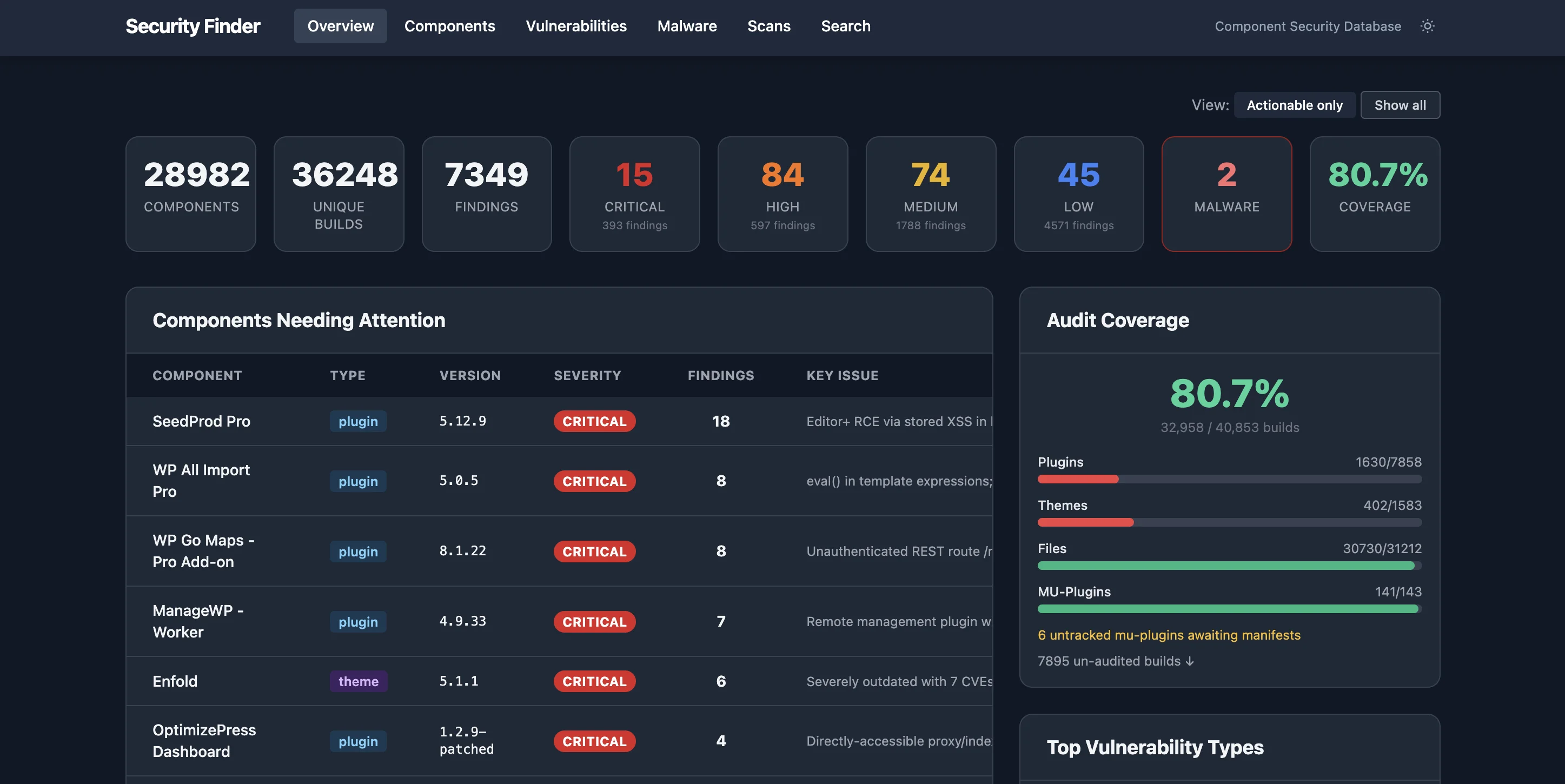
My first version of Security Finder used slug-and-version matching. If I audited Contact Form 7 version 6.0.2, any site running that same slug and version would show as covered. I built the import system, the REST API, the WP-CLI commands, the web interface. It was a real tool.
But it had a fundamental problem.
Version numbers lie. Two sites can run “the same plugin at the same version” with completely different code. Modified files, patched versions, nulled copies, or just plugins downloaded from different sources. Slug-plus-version matching gave me a false sense of coverage. I was marking sites as audited when the actual code running on them had never been reviewed.
I scrapped the version-based approach and rebuilt Security Finder around content hashes. SHA-256 hashes of every plugin and theme’s actual file contents. The lookup strategy became: hash first, version fallback. If the hash matches, you know with cryptographic certainty that the code is identical to what was audited. No assumptions. No false coverage.
The hash-based deduplication also made fleet-wide scanning dramatically more efficient. If 40 sites run the same plugin with the same hash, I audit it once. One audit covers 40 sites. The import system tracks how many components it skips via hash dedup. On a typical fleet scan, 60-70% of components are deduplicated.
Every tool was born from a real incident.
Security Finder was the foundation. But I needed tools for every phase of the security lifecycle. Detection, analysis, remediation, prevention. I built them all.
Each tool was born from a real incident. The fake dates script came from finding backdoors with timestamps spoofed to 2020. The database code audit came directly from that WooCommerce store where the skimmer hid in a WPCode option for 92 days. The elevated permissions detection came from finding a compromised site where the attacker had given the Subscriber role full admin capabilities.
A vulnerability disclosed today needs to be patched today.
Detection was only half the problem. I also needed to respond faster. I built four Claude Code skills that chain together into a complete security workflow.
/security-finder-scan runs the component audit pipeline. It pulls the component queue from the fleet, downloads each plugin or theme from a source site, runs Wordfence CVE scanning, then audits the code for 30+ vulnerability types. SQL injection, RCE, auth bypass, XSS, CSRF, object injection, hardcoded credentials. Everything gets imported into Security Finder with content hashes for deduplication.
/security-audit is the read-only investigation tool. It SSHes into a site and runs a 12-phase audit. Core integrity, malware scanning, plugin activity logs, user account review, server log analysis, attack timeline reconstruction, and persistence checks. It generates an HTML report with every finding documented.
/malware-cleanup is the remediation skill. It follows a strict protocol: kill persistence first, then remove malicious files, reinstall WordPress core, reset all credentials, destroy sessions, regenerate salts, and harden the installation. The critical part is the mandatory verification loop at the end. It runs two consecutive clean checks before declaring the site safe. No shortcuts.
/security-patch-deploy handles fleet-wide patching. When Security Finder identifies a vulnerable component, this skill downloads the plugin, develops a patch, packages it, uploads it to B2 storage, and deploys it to every affected site simultaneously. Up to 20 concurrent SSH connections. It patched 155 out of 157 environments in a single run for the first deployment.
Two sites running the same plugin with different file hashes means something is wrong.
The last major piece was captaincore drift. I built it in late March as a 1,355-line Go command that shows the version distribution of every plugin, theme, and WordPress core installation across the entire fleet.
The basic use case is straightforward. Run captaincore drift --plugin=contact-form-7 and you see every version of that plugin running across all sites, how many sites are on each version, and which sites are behind. But the real power is the --hashes flag. It compares stored content hashes across sites to detect file-level drift even when version numbers match.
Two sites running “Contact Form 7 v6.0.2” with different file hashes means something is wrong. Maybe one was modified. Maybe one was downloaded from a sketchy source. Maybe one was compromised. Drift catches it.
The --steer flag takes it further. It triggers updates on drifted sites to bring them back in line with the fleet. Combined with Security Finder, drift detection closes the loop: scan, audit, patch, verify, and then monitor for drift.
We started finding vulnerabilities before the attackers did.
The tooling paid off in ways I didn’t expect. Security Finder wasn’t just cataloging known CVEs. The Claude Code audits were finding vulnerabilities that had never been reported.
The first big discovery came from the WooCommerce store investigation itself. While tracing how the attackers got in, I found an unauthenticated file upload vulnerability in WooCommerce Wholesale Lead Capture. The plugin’s AJAX upload handler read its allowed file types from the request parameters. Attacker-controlled. WordPress mime-type validation was explicitly disabled. Any anonymous visitor could upload and execute arbitrary PHP.
I reported it to the plugin author (Rymera Web Co) on February 12 with a proof-of-concept and suggested fix. They released a patched version six days later.
Then in March, the capture monitoring system flagged something strange on 13 sites running the Widget Logic plugin. An external JavaScript file was being loaded from widgetlogic.org on every page. The plugin author had injected it into the plugin code and was using non-standard version numbering to prevent WordPress auto-updates from delivering a clean version. I reported it to the WordPress.org plugin team. They closed the plugin the same day. (I wrote about that one separately in How We Caught a WordPress Plugin Supply Chain Attack.)
Those were the ones that got fixed upstream. But the Security Finder audits kept turning up more. Unauthenticated SQL injection in Save Contact Form 7. File write vulnerabilities in Yoast Keyword Tool. A plugin called SmartQuizBuilder that turned out to be an obfuscated backdoor with 153 unauthenticated AJAX endpoints. Another plugin with hardcoded RSA private keys. For each one, I built a patched version and deployed it across the fleet while drafting disclosure emails to the authors.
Going from “our sites are getting hacked” to “we’re finding and reporting the vulnerabilities ourselves” was the turning point. That’s when I knew the security reset was working.
5,800 lines of new security code in two months.
Here’s what two months of security work looked like.
The malware we found used six different encryption methods. RC4 with 16-byte IVs. AES-256-CBC. Base64 with gzdeflate. XOR with key derivation. HTML entity obfuscation. Dynamic function construction via string reversal. These weren’t amateurs.
Every site is now protected by a system that didn’t exist two months ago.
Today, every site on Anchor Hosting is protected by a layered security system that didn’t exist two months ago. The full breakdown lives at anchor.host/security, but here’s the short version.
Continuous monitoring runs around the clock. Homepage captures detect injected scripts and stylesheets. Malware scans trigger on every code change. WordPress core checksums verify file integrity. Google Web Risk checks for blocklisted domains. Uptime monitoring catches outages. The CaptainCore SecurityLogger tracks every security-relevant event: user creation, role changes, plugin installs, password resets, option modifications.
Automated maintenance handles the basics. Nightly backups. Nightly quicksaves with built-in malware scanning. Managed WordPress and plugin updates. PHP version upgrades with compatibility fixes.
Scheduled scanning runs Security Finder vulnerability scans across roughly 20 sites per day, rotating through the fleet continuously. Weekly PHP error sweeps catch issues before they become vulnerabilities.
Vulnerability management ties it all together. Security Finder maintains a complete inventory of every component across the fleet. When a vulnerability is disclosed, I can see every affected site in seconds. The threat tracking system follows each issue from discovery through investigation to resolution, with process logs on every affected site.
Forensic tools handle the edge cases that automated scanning misses. The malware-hunt script with 50+ detection patterns. Fake date detection for timestamp-spoofed files. Elevated permissions scanning for privilege escalation. Database code auditing for threats stored outside the filesystem. Frontend capture scanning for injected JavaScript.
The old model of WordPress security is dead.
The old model was reactive. Wait for a vulnerability to be disclosed, then update. Wait for a site to get hacked, then clean it up. Keep your plugins updated and hope for the best.
That model is dead.
AI-powered vulnerability discovery means exploits appear faster than patches. Attackers are finding zero-days in plugins that the WordPress community considered safe for years. The only real defense is complete visibility into what’s running across your fleet, cryptographic verification that the code is what you think it is, and the ability to patch everything in hours instead of weeks.
February was the worst month of security incidents I’ve experienced in over a decade of WordPress hosting. March was the month I rebuilt everything. Every process has been remade. Every tool has been rebuilt or replaced. April has been very smooth with security incidents on a sharp decrease.
The same technology that supercharged the attackers is what made it possible to build a defense that actually works. Anchor Hosting is now more secure than it’s ever been. Always remember, security is never finished. Always be vigilant and proactive.
