
As a web host, I’ve always kept a pretty clear line around what I do. Anything that affects the health of a website is mine. Uptime, backups, security, and the routine maintenance of keeping every plugin up to date.
Building websites was not. Fixing things on a website was not. Setting up a form, configuring a plugin, changing content on a page. That was the web designer’s job, and I stayed out of it.
That line doesn’t make sense anymore.
With Claude Code I can do almost all of it, almost effortlessly. I can build sites. I can set up forms. I can configure plugins. Everything that would be categorized as the web designer’s responsibility, I can now do as a web host.
And I can do it faster than the agency can. Not because I’m a better designer. Because I’m using Claude Code and they aren’t.
That’s not a knock on agencies. It’s the opposite. I want the people building sites on Anchor Hosting moving at the same speed I am. So this post is for the agency owner, the web designer and the web developer. Here’s how to connect Claude Code directly to your Anchor Hosting account and let it drive.
Claude Code needs SSH. You don’t need to know what that means.
I think this is the real reason more web designers aren’t driving Claude Code for their WordPress work. The moment it comes up, the conversation turns into SFTP, SSH, keys, ports and terminals. Plenty of really talented designers have never needed any of that, and it feels like a wall.
Here’s the thing. You don’t need to know it.
You just need to know that Claude Code needs a way into the server in order to drive itself. With that access it can run WP-CLI, read the files, query the database and check its own work. Without it, Claude is guessing, and you’re the one copying and pasting between a chat window and wp-admin.
So I built that door into Anchor Hosting. You sign in, click Allow, and Claude Code has the access it needs. No keys to generate. No SFTP client. No hostname or port to look up.
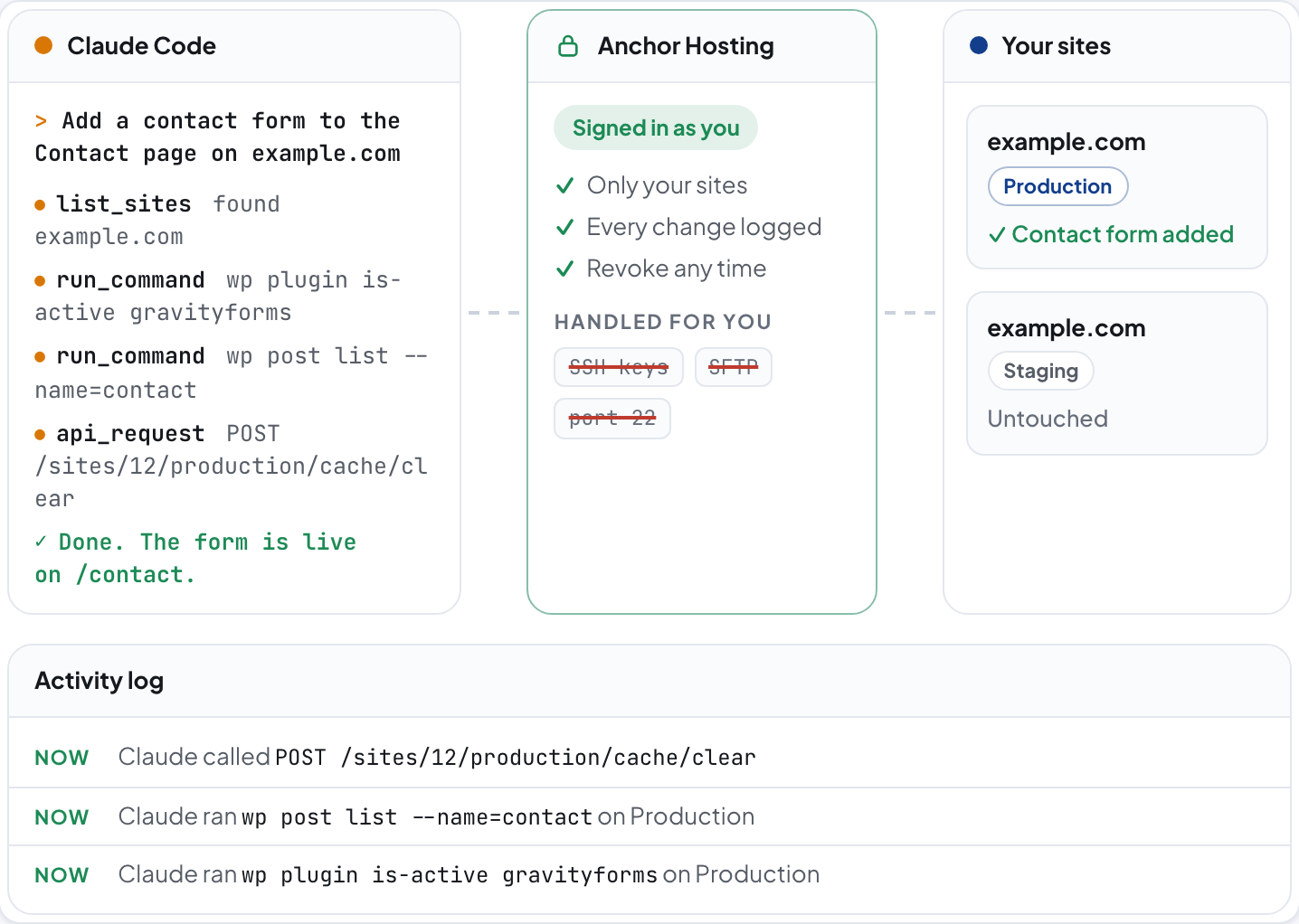
- list_sites found
example.com - run_command
wp plugin is-active gravityforms - run_command
wp post list --name=contact - api_request
POST /sites/12/production/cache/clear - Done. The form is live on /contact.
- Only your sites
- Every change logged
- Revoke any time
- nowClaude called
POST /sites/12/production/cache/clear - nowClaude ran
wp post list --name=contacton Production - nowClaude ran
wp plugin is-active gravityformson Production
Setting it up takes about a minute.
Open your Profile in the Anchor Hosting dashboard. There's a Claude connector card with everything you need. In a terminal, run this:
claude mcp add --transport http anchor-hosting https://anchor.host/wp-json/captaincore/v1/mcpThen start Claude Code and type /mcp. Pick anchor-hosting and choose Authenticate. Your browser opens to an Anchor Hosting sign in page. Sign in, read what Claude is asking for, and click Allow.
That's it. Claude Code can now see every site you manage with us.
Not a terminal person? The same connector works in Claude on the web, the desktop app and your phone. In Claude, open Customize → Connectors → Add custom connector and paste the URL from the Claude connector card.
Then you just describe what you want.
Once it's connected, you stop thinking in terms of hosting panels and plugin settings screens. You describe the outcome. Content changes, new forms, new pages, plugin configuration, even a brand new site. It's all just a few words away.
Here's the kind of request I mean.
No one in that exchange had to know where the site lives, what PHP version it runs or how to connect to it. Claude worked that out from the access it was given.
There's more than one way in.
The connector is where I'd start. It's not the only option though, and it's worth knowing what the others are.
| Way in | Setup | What Claude can do | Best for |
|---|---|---|---|
| Claude connector | Sign in and click Allow | Everything the dashboard does, plus WP-CLI and shell commands on production or staging. Every change logged | Most agencies |
| Application password + API docs | Create a password in Profile and hand Claude the API docs | Everything the dashboard does, over the REST API | Automations and your own tools |
| Your own SSH keys | Add a public key in Profile. Kinsta sites use the SFTP password on each site | Anything the server allows, outside the activity log | People who already live in a terminal |
I use Claude Code like it has root access. You probably shouldn't.
Full disclosure. My own setup is the far end of that table. Claude Code drives CaptainCore directly for me, with access to the whole fleet. I built the platform, I'm watching it all day, and it makes sense for how I work.
It probably doesn't make sense for most people running an agency.
The connector is a narrower door on purpose. It only sees your sites. Every command is written down. It can't touch your passwords, your two-factor settings or your payment details. It can be shut off with one click. And it tells Claude how to behave when it connects: read the current state before changing anything, prefer changes WordPress can undo, confirm before anything destructive, and use staging when you want to try something safely.
The bigger shift is learning to move at the speed of an agent.
Connecting Claude Code to your hosting is the easy part. The harder part is changing how you work.
For a lot of creative professionals, AI is still a side tool. Something you ask for copy ideas or a code snippet, then go back to clicking through wp-admin yourself. That's leaving almost all of it on the table.
The agent should be the primary way the work gets done. You decide what the site needs. Claude does the clicking, the configuring and the checking.
That's the gap I want to help close. Not everyone is going to run Claude Code with the keys to everything, and they shouldn't have to. They just need a safe way to hand it the access it needs.
Now there is one.
