
The goal of web hosting should be to put as many layers as possible between you and the server.
That sounds backwards. More layers usually means more vendors, more complexity and more places for things to break. But every layer is someone, or now something, whose job is to deal with the server so you don’t have to.
I started with nothing between me and the server.
When I first got started with web hosting, I was on a Media Temple Grid account. You paid about 20 bucks a month and could create up to 100 sites. It felt like a steal.
As most people know, if you actually try to fill one of those up, you outgrow it fast.
So I upgraded to a Media Temple dedicated server. That was a big step up in power. It was also a big step up in responsibility. With your own server, you manage everything. Operating system updates. Security patches. Mail. The 3 AM outage. All of it.
It turned out to be a really bad experience. Nothing stood between me and the server. When something broke, I was the one who had to fix it, whether or not I knew how.
Managed hosting added layers I didn’t have to hire.
Managed WordPress hosting changed that. Companies like Kinsta, WP Engine and Rocket.net sit between you and the hardware. They run on top of a cloud provider, and the cloud provider runs the actual server.
That’s two layers between you and the server, and each one has people whose job is to keep it running. Anchor Hosting has been built on that model for years. My customers talk to me, I work with Kinsta and Rocket.net, and their engineers keep the servers healthy.
- YouWeb developerOn call 24/7
- ServerUpdates, patches, outages
- YouWeb developer
- Managed hostKinsta, WP Engine, Rocket.netSysadmins on call
- Cloud providerThe data center
- ServerSomeone else’s problem
- YouArchitect and reviewer
- AI supportAnswers and digs in
- AI platformFinds problems, plans features
- AI sysadminHeals the serverOn call 24/7/365
- ServerSelf-healing
People AI agents Who gets the 3 AM page
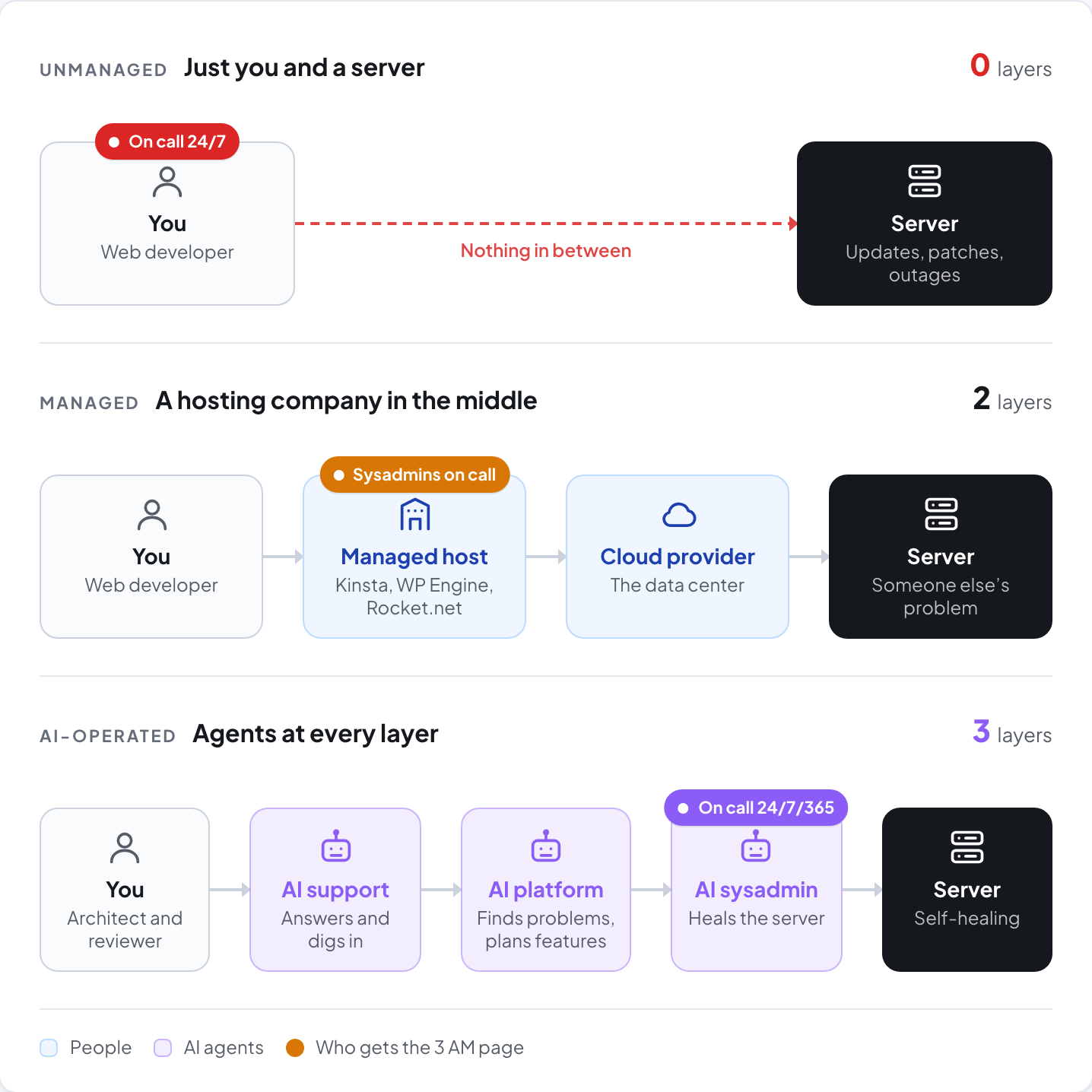
The sysadmin layer was always the expensive one.
Look at who carries the pager in each of those models. Somebody has to be awake when a server falls over. That layer needs coverage 24 hours a day, 365 days a year.
To get that coverage, a hosting company needed a certain critical size. Enough engineers spread across enough time zones that someone is always on shift. You couldn’t start a real hosting company with one or two people. You needed a whole bunch of sysadmins on standby before you could even begin.
That’s a big part of why managed hosting exists as a business. Most of us were never going to staff that layer ourselves.
I think that’s all changing now.
The new reality is that one person can add layers between themselves and the server by putting different AI agents on different jobs.
What does web hosting look like if built from scratch in 2026?
That’s something I keep pondering. If you take web hosting down to the basics and assume AI is available at every layer, what do you actually need?
So I’ve been experimenting with exactly that. I’m building a self-run hosting tier inside CaptainCore, the platform behind Anchor Hosting, on a single bare metal server. A container per site, page caching, backups, sign-in protection. Claude Code does most of the building. I describe what I want, it builds it, tests it and reports back.
Here’s part of a report from one of those sessions.
Building my own hosting platform from scratch is now doable. I don’t think most people should attempt to do that. There are a ton of fine-tuning settings in a report like that one. How many failed sign-ins before a block. Which PHP functions to turn off. What a blocked visitor should see. I feel I it still takes some domain knowledge to direct the AI otherwise auto acceptance will let to a platform with large gaps. Most people wouldn’t want to, and that’s fine. That’s what the layers are for and why Anchor Hosting exists.
Do we still need humans juggling every ball?
Why do we need all of the complexity of web hosting? The goal is to create the most reliable platform possible. Until now, doing that meant human beings juggling all the balls in the air.
Is that required anymore? Do we need a human at every point in the platform to make it more reliable and more secure? I think that’s up for question.
Humans should be the architects. Humans should review. And humans should still be talking to humans, which touches support.
Beyond that, I think we’re at the point where AI can operate the entire hosting stack, more reliably and with more fallbacks.
Self-healing was always the goal.
Every hosting platform worth building has chased the same idea. Make it heal itself. Restart the crashed service. Fail over. Roll back the bad change.
Before, that meant scripts and runbooks. They could only handle the problems someone saw coming.
Now the healing can be intelligent. When something goes wrong, an AI agent can look at what actually happened, make a decision, and bring things back online without any human intervention.
The goal hasn’t changed. The more layers between you and the server, the better.
